Make the program clear to staff. Make the next change with evidence.
Put teaching instructions beside each goal. Teachers and paras record observations from the classroom; you review the measurements, preview a program change, and ask the team to acknowledge the new instructions.
No credit card. Start with your own classroom or caseload.
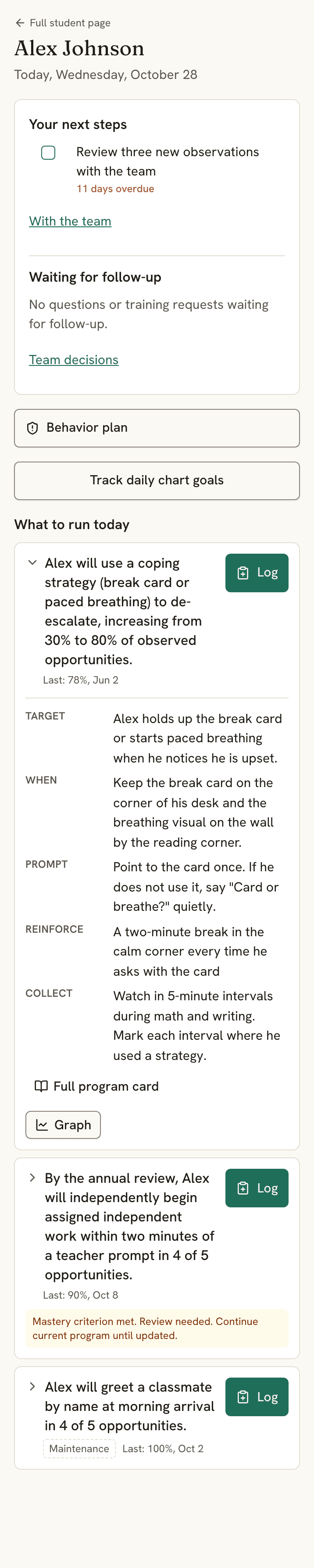
Review the staff view before changing the program.
Draft the change.
Keep work on an existing goal as a saved draft. Classroom staff continue to use the published instructions.
Preview and publish.
Read the staff-facing card before publishing the revised program. Version history keeps captured program changes available for review.
Ask for acknowledgment.
Record a support change and request team review. Staff can mark it read, ask a question, or request training; you can follow up on the responses.
Publication and a team review request are separate actions. Publishing instructions does not confirm that staff have read them.
The school-side record, priced for a small practice.
How each goal is run, ABC incidents, trial data, daily notes from classroom staff, an FBA summary, a BIP draft, and packets for meetings and families. It starts from the classroom: make it trivial for the people in the room to record what happened, then give you the structure and the export.
Not practice management.
No billing, no claims, no insurance authorizations, no session notes tied to billing codes, and not a HIPAA business associate. If you bill a payer, keep the clinical system you use for that. Keep payer documentation in the system your practice uses for it.
Built around who is actually in the room
The para's phone, the clipboard, the graph, and the message that reaches everyone when the program changes.
Keep the instructions beside the goal.
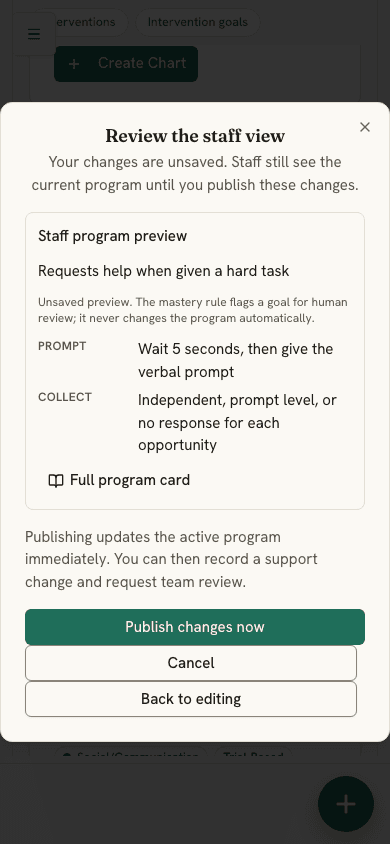
The program card on each goal: what to present, the prompting hierarchy, the reinforcement schedule, the wait time, the error correction, the mastery rule. The para opens the student on a phone and the Today view shows what to run and how. One tap per response, with undo. Paras log data and respond to a change; the plan stays yours.
01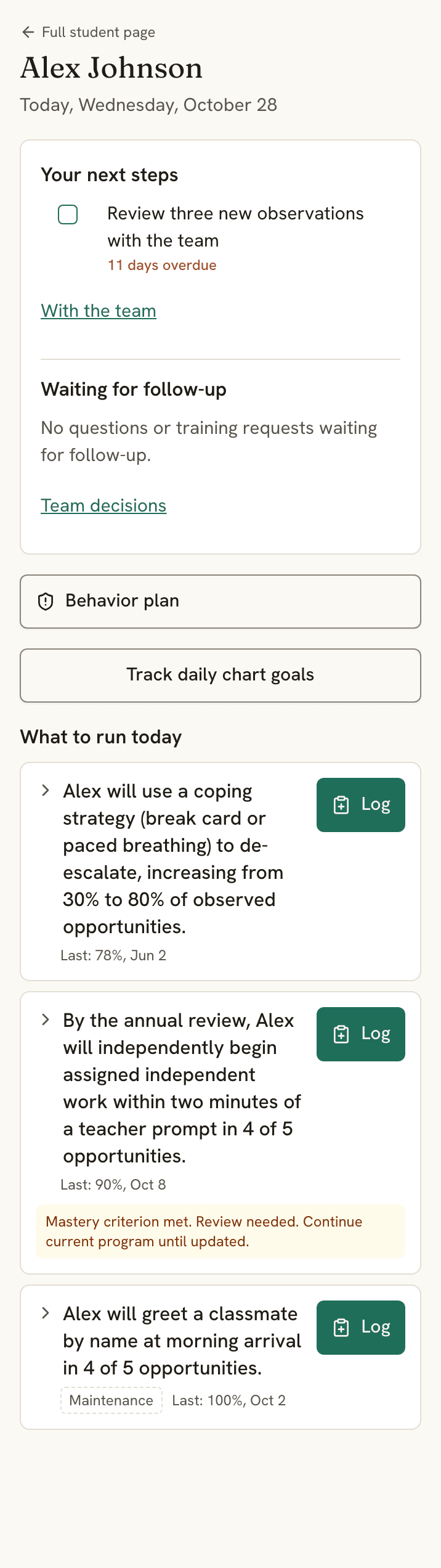
What to run today How to run it Trial and ABC data, on paper or a phone.
Print the trial sheet with your goals filled in, or the ABC sheet, and hand it to the staff who are there. Tapped in on a phone, the same session lands on the goal as a dated data point with its prompt level. Setting, antecedent, behavior, consequence, duration, and your hypothesized function, tied to the goal it belongs to.
Print the data sheets, no account →02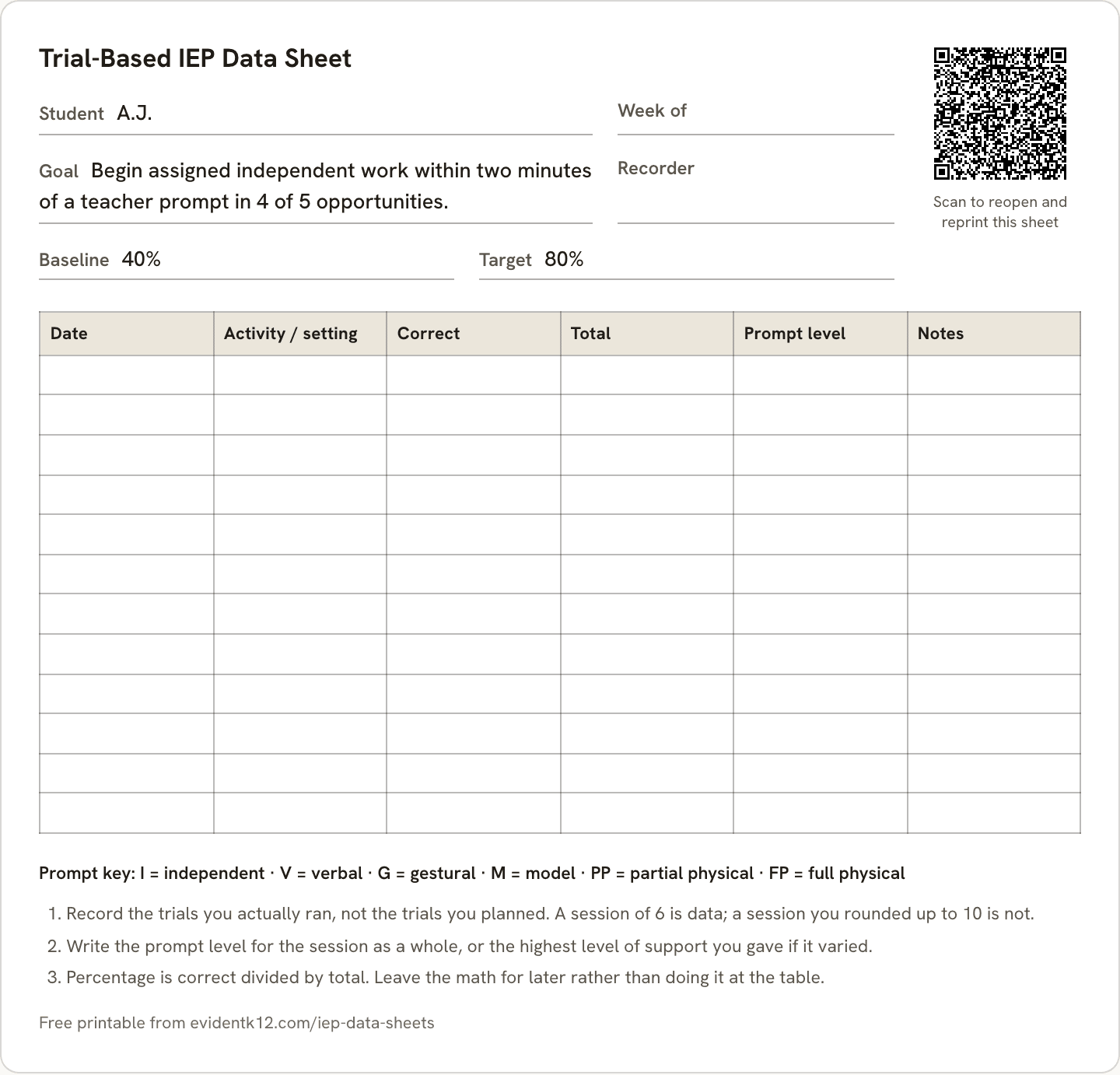
Trial data, with your goal filled in 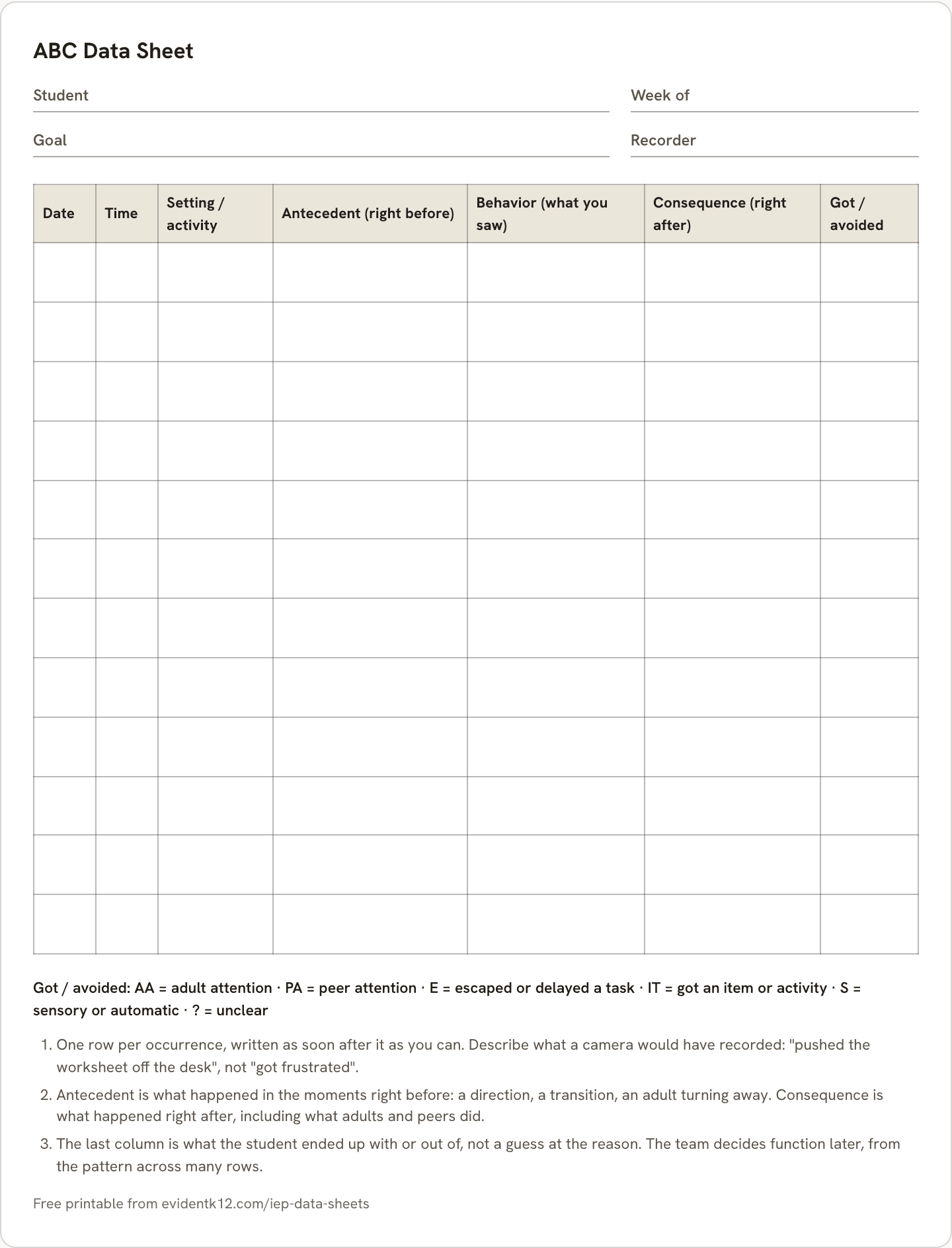
ABC data for the classroom Mastery is flagged for your review, never switched on its own.
Set the rule by session (80% in 3 of the last 3) or by day with a minimum of opportunities a day, and it reads the right direction for a reduction goal. The graph draws baseline, target, and each dated phase line. When the data meets the rule, the goal asks you to mark mastered, move to maintenance, or keep going. Nothing changes until you choose.
03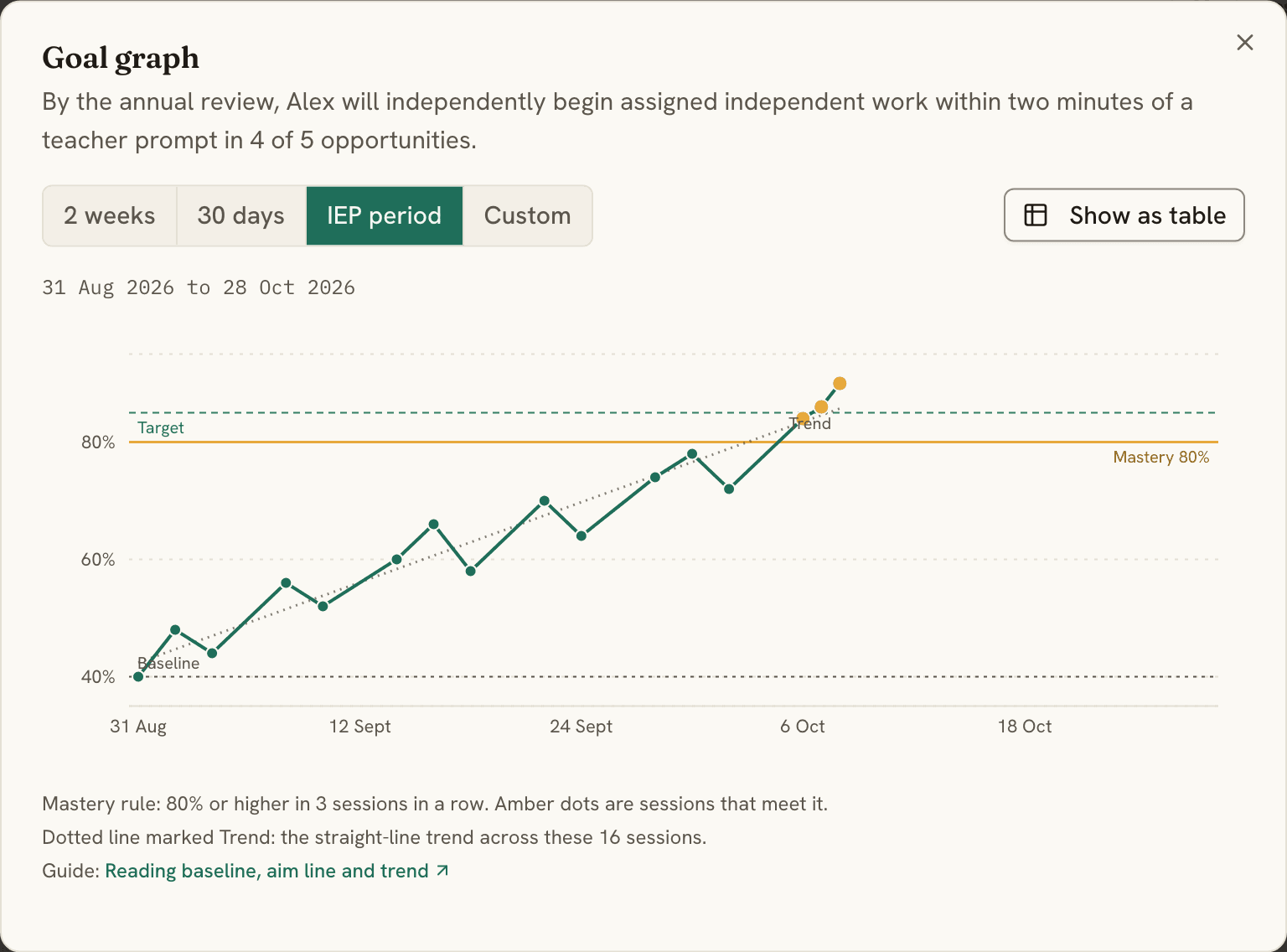
When a program changes, the team hears it.
After you change how a goal or a behavior plan is run, tell the people who need to know. Each of them marks it read, asks a question, or asks for training; you see who has answered, and the change draws a dated phase line on the graph. An unanswered question waits on the para's Today view and on Needs a look until it is done.
04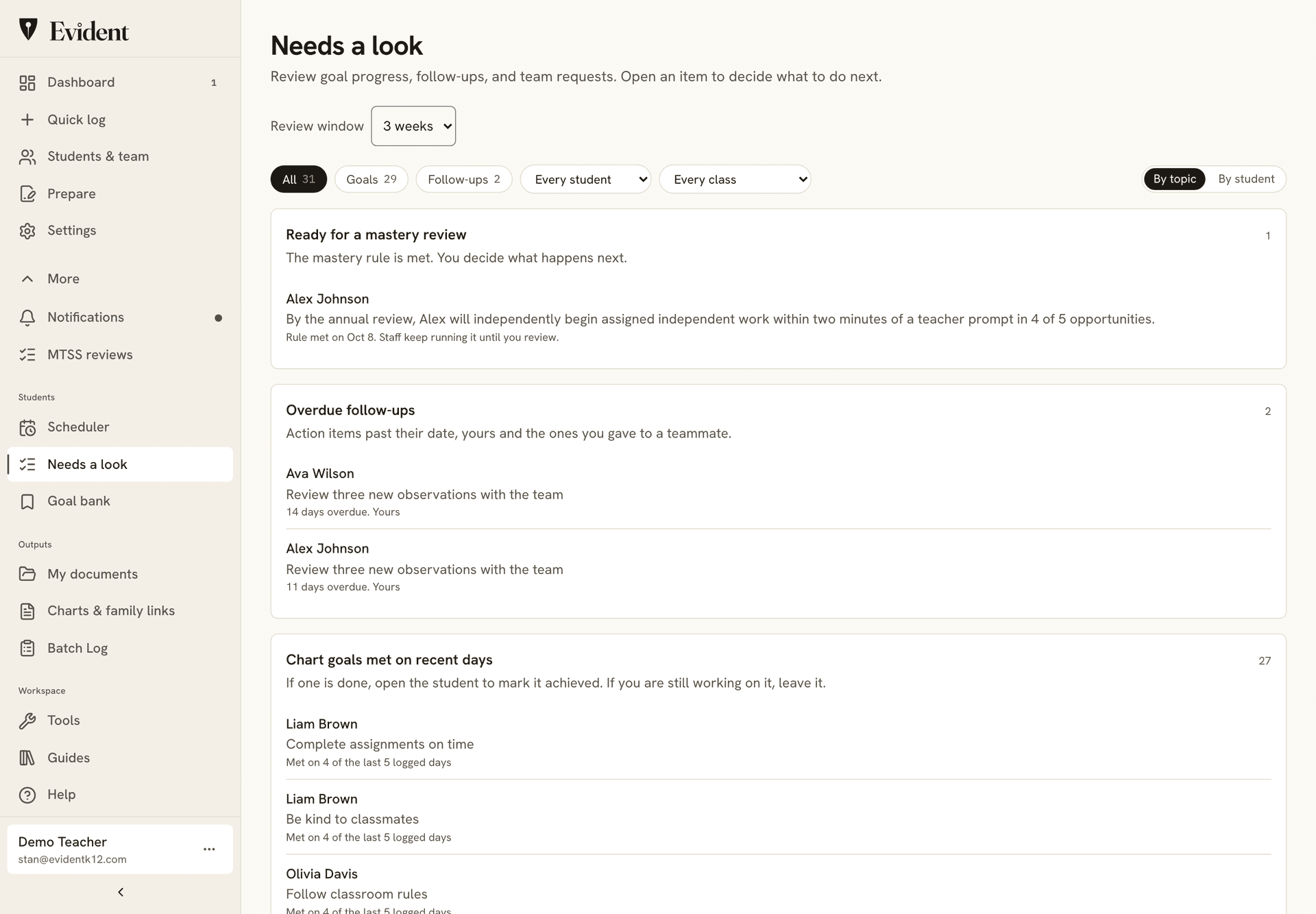
Also included
- The pattern, without rebuilding it nightly. The FBA summary holds each student's incidents this month against last month, with the recent entries underneath.
- A behavior plan draft, not a blank page. The BIP draft builder walks target behaviors, replacements, prevention and response strategies, and the data plan in four steps. You rewrite it in your own clinical voice.
- Evidence organized for the next meeting. Dates, notes, goal progress, and the incident history in one PDF packet for the ILP team or the family, rather than screenshots pasted into a document.
- 152 written goals. 70 of them aligned to ILP language, each with run steps, in the goal library.
- Every measurement the goal calls for. Trials, frequency, duration, interval, rate, latency, task analysis, and yes or no, each with its own printable sheet.
- Caseload Calendar. Enter each student's minutes and the classes they can't miss; it places the sessions and names the student you keep meaning to get to.
- The people who collect your data already live here. Teachers and paras log on the same student record they use for charts and daily notes. No second system for them to remember, which is usually why the data stops arriving.
- Families, in 28 languages. A portal from a QR code, no app. The incident record and your staff notes are not in it unless you put them there.
Student data stays safe, and stays yours.
Plain promises, each one backed by how Evident is built.
- EncryptedStored and sent
Student records are encrypted where they're stored and on the way to your screen.
- Never soldTo anyone
Not in any form. Our agreement with your school says so in writing.
- No adsNo marketing
No ad networks, no tracking pixels, nothing marketed to students or families.
- Never trains AINames removed first
On our EU service, AI writing tools stay switched off. Family updates are translated in the EU with student names removed first. Reports use recorded observations and goal data, which staff review before sharing.
- LockedTo the right people
Staff see only the students shared with them, in the role they were given. The system enforces it, not just the screen.
- 24 hoursTo tell your school
If something ever goes wrong, we tell your school within a day of learning about it.
Download it anytime. Export any student's record as a PDF, or the school's records as a file.
Delete it anytime. Remove a student or an account yourself. It's gone from backups within 30 days.
See who looked. Every change, and every opened private note, is logged. The log can't be edited.
- EU data residency
- Signed DPA for schools
- No government ID numbers, birthdates, or home addresses
- Two-step sign-in
- Every company that touches the data, listed publicly
Read our 12 student privacy commitments →Security overview →
Common questions
Is Evident an ABA practice management system?
No, and it is worth being direct about that. There is no billing, no insurance claims, no authorization tracking, and we are not a HIPAA business associate. Evident is the school-side record: what the classroom team observed, what the goals are, and what the data shows over time. If you bill insurance or Medicaid, keep the clinical system you use for that and use Evident for the school data it was never good at collecting.
Can classroom staff collect usable ABC data without training from me?
That is the design constraint the incident form is built against. It asks where it happened, what came before, what the behavior was, what followed, and optionally how long it lasted, in plain language, on one screen. You add the hypothesized function and the goal link. Use the form with your team to agree on what to observe and how to record it.
Can a para run a program from a phone without editing it?
Yes. Share the student with a paraprofessional or aide and the student opens for them on a Today view: what to run, how to run it (target, when, wait time, prompt, reinforcer, what to collect, mastery rule), one tap per response with undo, and the behavior plan. They can log data and respond to a change; the goal and the plan are edited by you and the co-teacher or specialist shares.
Does it run a functional behavior assessment?
It collects and organizes the data an FBA rests on, and summarizes incidents by month and by student. The analysis and the clinical judgment are yours. We have a practical guide to running an FBA with a school team if it is useful to hand to staff.
What does it actually cost for one behavior analyst?
The free plan covers 30 students with a goal chart each, daily tracking, ILP data points, FBA and ABC data collection, the BIP draft builder, the goal library, and the family portal, and it does not expire. Your first PDF report or meeting packet is free too. After that, meeting-ready PDF packets and CSV export sit on Pro at $12 a month or $120 a year. It goes on your own card and needs no district purchase order, which is usually the part that takes three months.
Who can see what I write about a student?
Roles decide it. Classroom staff see the daily record and the charts. Staff-only notes stay out of family packets by default, every access to a confidential note is audit-logged, and no administrator can force one into a parent packet.
Do families see any of this?
Only the parts you share. Families open a portal from a QR code with no app to install, and shared updates are translated into 28 languages. The incident record and your staff notes are not in it unless you put them there.
Further reading: the FBA and ABC data collection guide and a practical guide to running an FBA with a school team.
Put one student on it before you decide.
Add the student, hand the teacher the daily chart, and file the first incident yourself. After two weeks, review whether staff can keep it current and whether the record answers your team's questions.
Free for 30 students. The full documentation set is $12 a month or $120 a year, on your card, no purchase order.
See how your team uses the same record.
Classroom teachers
Daily goals, useful observations, and family updates that fit the school day.
Learning support case managers
Measured progress, team contributions, and review dates across your caseload.
MTSS coordinators
Review the support delivered alongside the progress measured, then record the next decision.
School & district leaders
Find records that need attention and follow through with the team responsible.