Know where each goal stands. Bring the evidence to the review.
Keep measured ILP progress, classroom observations, accommodations, and review dates together. Give the team a record it can inspect, with the measurements behind the summary still in view.
No credit card. Start with your own classroom or caseload.
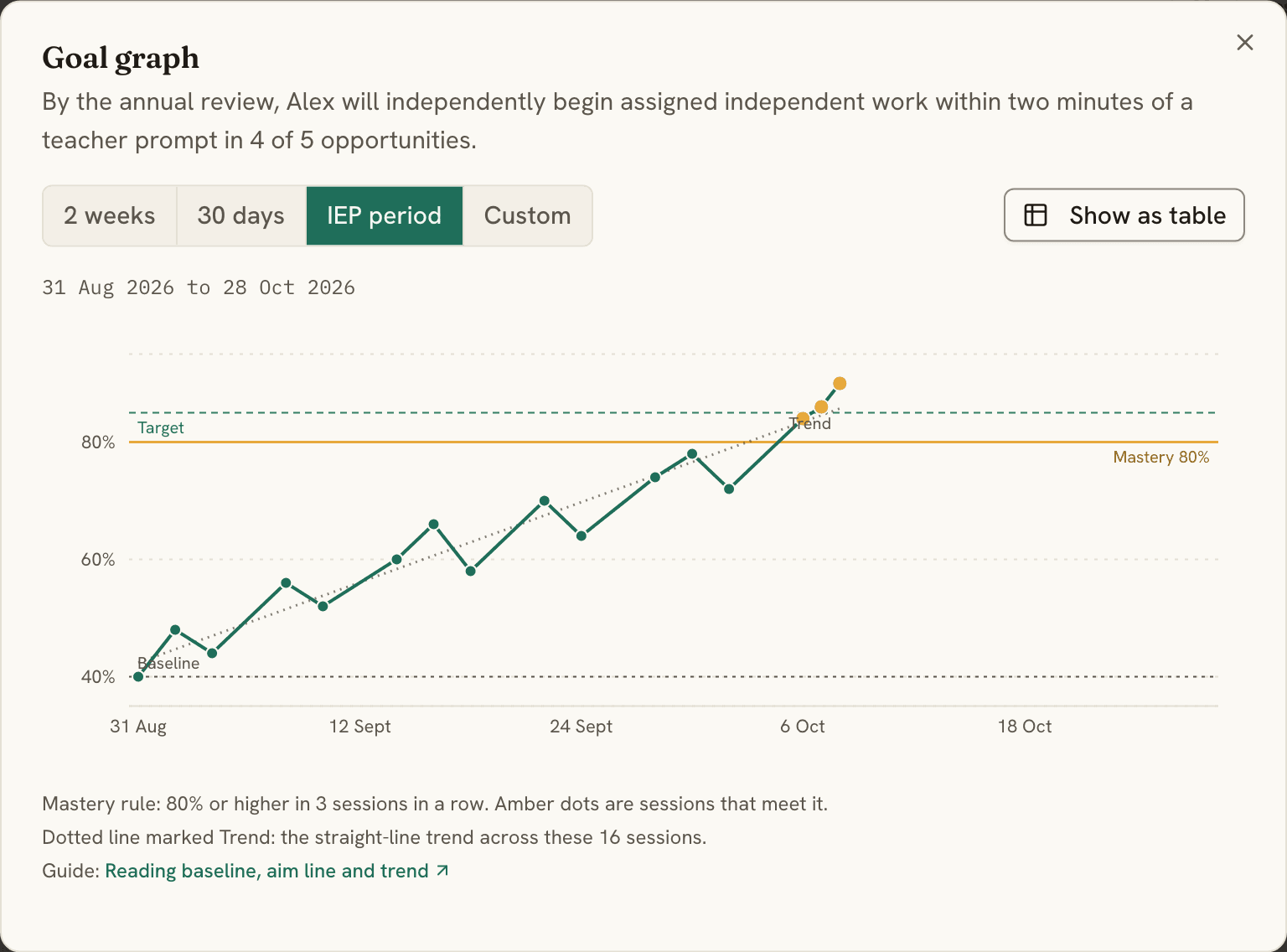
The summary has a record behind it.
Agree on the measure.
Set the baseline, target, and mastery rule. Staff record results in the measurement type the goal calls for.
Read the context.
Review dated observations, accommodations, and documents alongside the measurements. A note adds context; it does not become a numerical result.
Choose what the team sees.
Select the period and evidence for the ILP review. Check the report and summary before exporting or sharing.

Built for the caseload
What a case manager opens on a Tuesday, and what it looks like.
Prepare the packet in three steps.
Pick the meeting. Set the dates and who will see it, choose what goes in, write a short summary. The packet is built from the data the team recorded, and you check every line before it leaves.
01See which goals need a look.
One page lists every goal that met its mastery rule, is close, has shown no gain, or has nothing recorded lately, and every plan whose review date has passed. Filter by kind, student, or class, grouped by topic or by student. Each row opens the student. You decide what happens next.
Take the case manager tour →02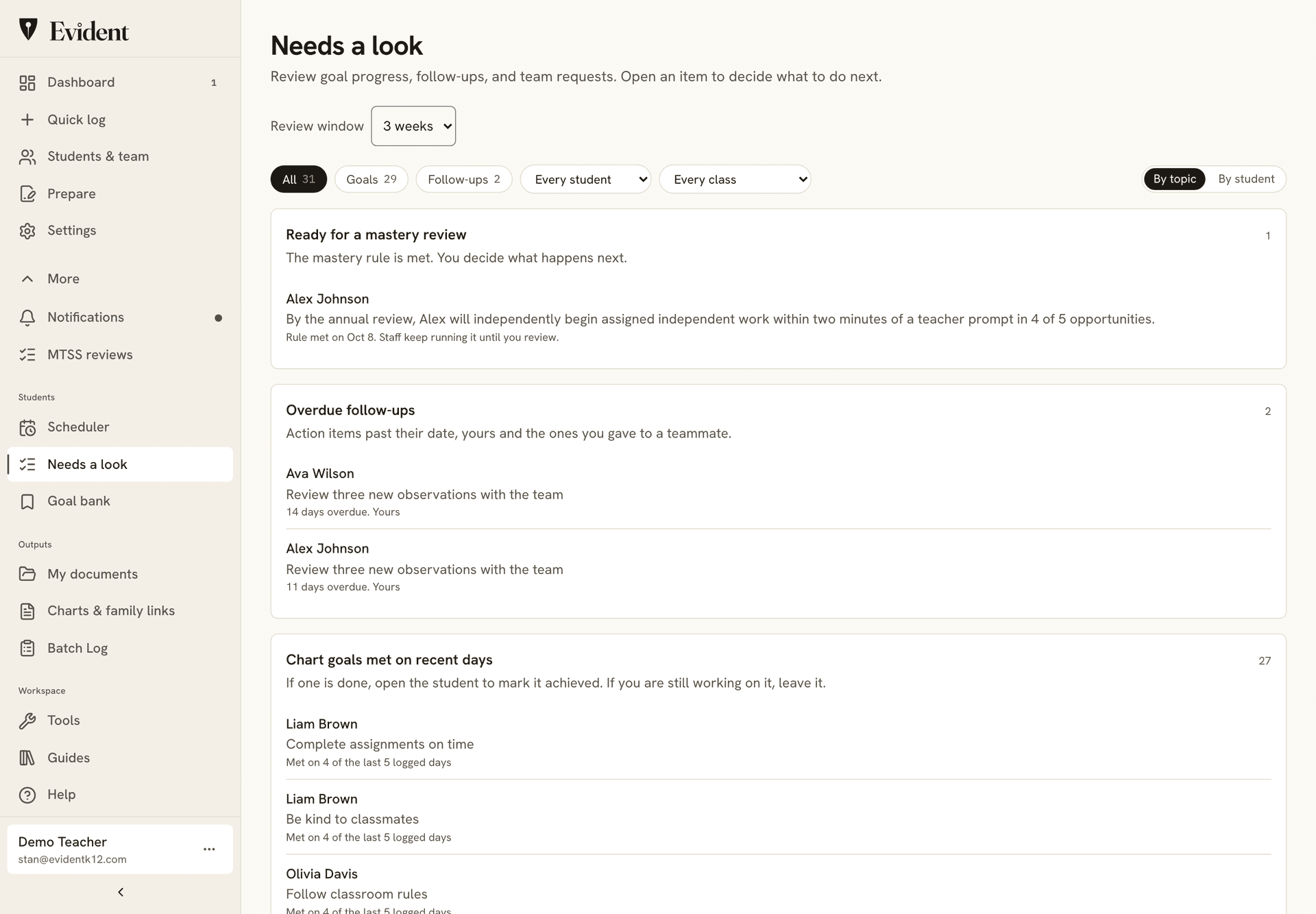
Start from a goal that's already written.
The library holds 152 written goals, 70 of them ILP-aligned, each with its measure and run steps a para can follow, beside the goals you saved yourself. Copy one to a student as you add them, then set the baseline and target.
03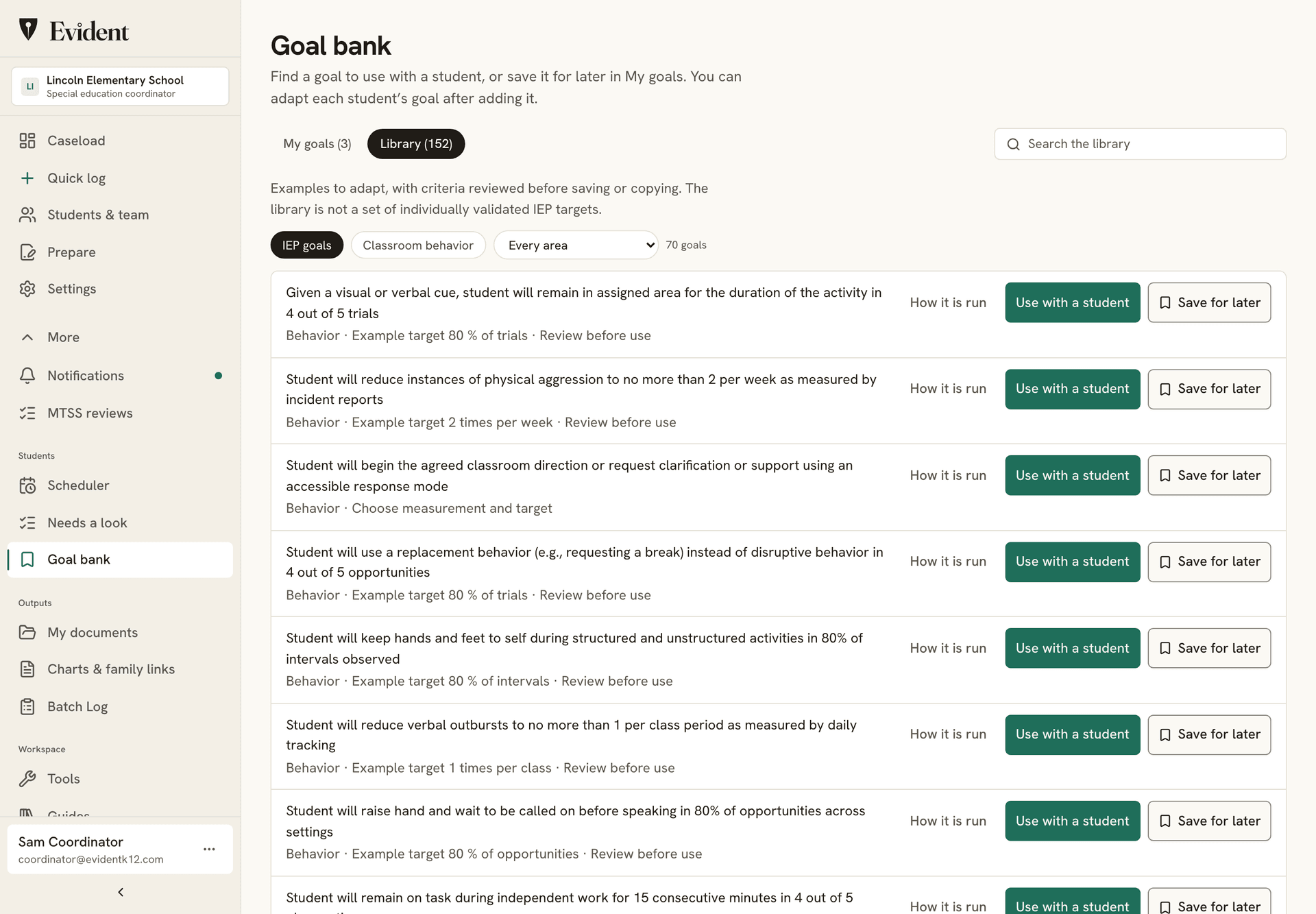
The plan lives on the student record.
Add the support plan, the meeting notes, or an assessment to the student's record with a review date. Past the date, the row says so and the student appears on Needs a look. The packet lists what's on file. The files themselves never leave the record.
04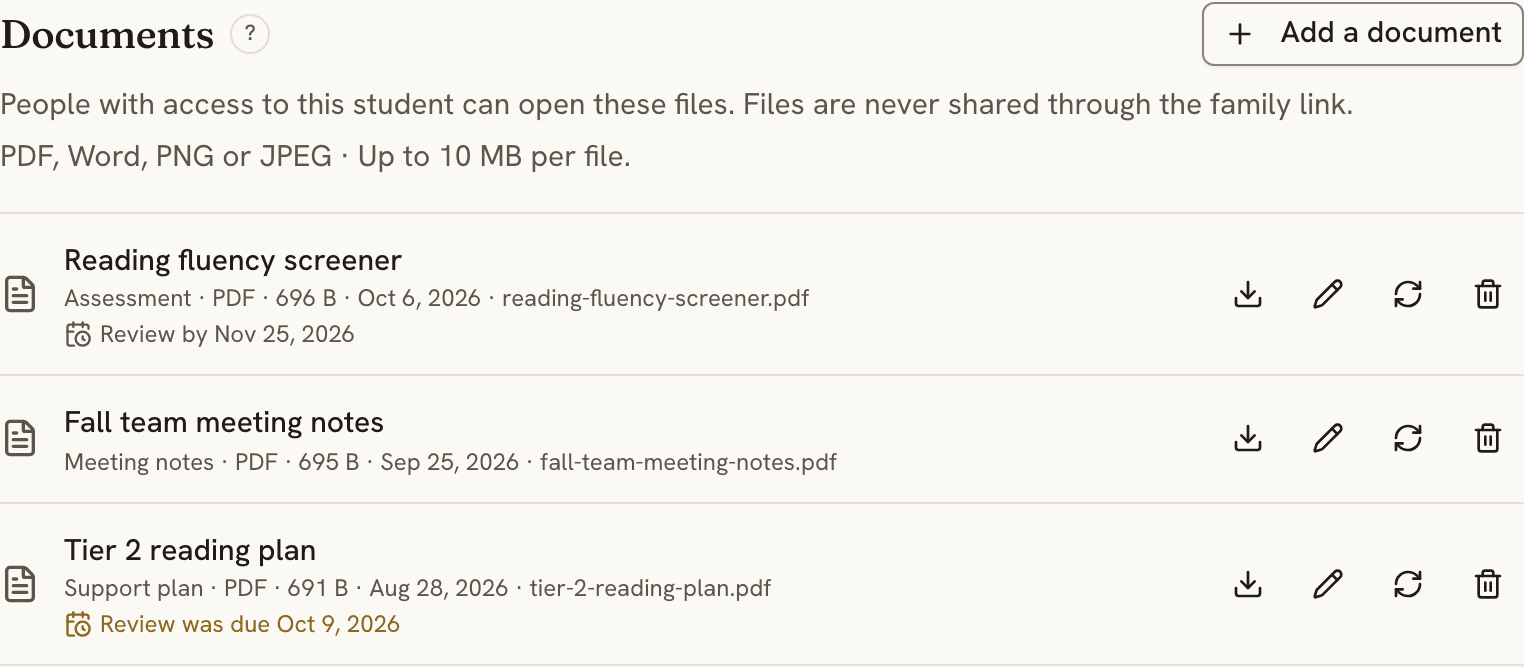
Also included
- The para's Today view. What to run, how to run it from the goal's program card, one tap per response. Paras log data and respond to plan changes; they can't edit the plan.
- Behavior plans. ABC incidents from the classroom, the FBA summary by month, and a BIP draft builder. FBA/BIP workflow
- Accommodations. Delivery, effectiveness, and history across the caseload. Accommodation workflow
- ILP progress reports. The chart-only PDF progress reports you review before meetings, translated with the English alongside. ILP workflow
- The meeting date. Asked when a student is added, with reminders as it approaches and the Prepare button beside it on the dashboard.
- Caseload status and the team. Your own status per student, co-teachers and specialists on the roster's Team view, and sharing by invitation for a colleague without an account.
- Caseload Calendar. A weekly grid for planning sessions and checking coverage against each student's support minutes.
- Family updates in 28 languages. A link or QR code, no app, no login; the family sees the day and the week, and signs.
Student data stays safe, and stays yours.
Plain promises, each one backed by how Evident is built.
- EncryptedStored and sent
Student records are encrypted where they're stored and on the way to your screen.
- Never soldTo anyone
Not in any form. Our agreement with your school says so in writing.
- No adsNo marketing
No ad networks, no tracking pixels, nothing marketed to students or families.
- Never trains AINames removed first
On our EU service, AI writing tools stay switched off. Family updates are translated in the EU with student names removed first. Reports use recorded observations and goal data, which staff review before sharing.
- LockedTo the right people
Staff see only the students shared with them, in the role they were given. The system enforces it, not just the screen.
- 24 hoursTo tell your school
If something ever goes wrong, we tell your school within a day of learning about it.
Download it anytime. Export any student's record as a PDF, or the school's records as a file.
Delete it anytime. Remove a student or an account yourself. It's gone from backups within 30 days.
See who looked. Every change, and every opened private note, is logged. The log can't be edited.
- EU data residency
- Signed DPA for schools
- No government ID numbers, birthdates, or home addresses
- Two-step sign-in
- Every company that touches the data, listed publicly
Read our 12 student privacy commitments →Security overview →
Common questions
Which ILP measurement types can we track?
Binary, frequency, duration, trial-based, interval recording, rate, latency, and task analysis, each with a baseline, a target, and a mastery rule per goal. The graph draws the baseline and target lines and marks the day the rule was met.
Does this support FBA and BIP work?
Yes. Classroom staff log ABC incidents in a few seconds from a phone, you add the hypothesized function and link it to the goal it belongs to, and the BIP draft builder walks target behaviors, replacements, prevention and response strategies, and the data plan in four steps.
How do accommodations stay current?
Each accommodation carries an effectiveness rating, an active or inactive status, and its source document. Daily notes tie back to the accommodation they were delivered under, so a review opens on data rather than memory.
Where does the plan itself live?
On the student's record, in the Documents section of the Support plan tab: a PDF, Word file or image with a title, a kind, and an optional review date. Past the date, the row says the review was due and the student appears on Needs a look. A packet lists what is on file by title and date; the files themselves are never attached to it.
Can a paraprofessional log data without being able to change the plan?
Yes. Share a student with a paraprofessional or aide and they open a Today view on their phone: what to run, how to run it from the goal's program card, one tap to log each response, and the behavior plan. They can log data and respond to a program change. Editing the goals and the plan stays with you and the co-teacher or specialist shares.
Who can see private case-manager notes?
Notes are private to staff by default and never reach a family unless you publish that note. Every opened private note is written to an audit log the school can read, and a note marked confidential is never silently downgraded by anyone else's share.
Try the BIP draft builder or the printable ILP data sheets with no account.
Keep a useful record for every student.
Free for 30 students, with every goal type and the Today view. The PDF reports and packets come with Pro or a school plan, and the first one is free.
Talk to us about a pilotAccess and privacyDPA, NDPA and state addenda
See how your team uses the same record.
Classroom teachers
Daily goals, useful observations, and family updates that fit the school day.
MTSS coordinators
Review the support delivered alongside the progress measured, then record the next decision.
School & district leaders
Find records that need attention and follow through with the team responsible.
Behavior analysts
Staff instructions, attributed observations, and reviewed program changes.